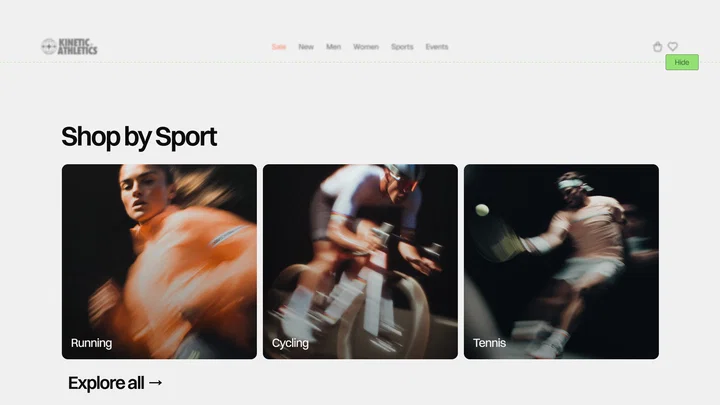
Floating Navbar
A header that sits wide open over your hero and folds into a small floating pill once people start scrolling. Scroll back to the top and it opens up again.
One of 131 GSAP components in React, Vue and HTML.
On mobile
Floating Navbar is in the free Starter Pack.
This exact component in React, Vue and HTML, in your inbox, ready when you're back at your desk. No card, no trial.
How it's built.
The background doesn't shrink as one bar. Its two sides close in from the edges of the screen, and the logo and the button ride those edges inward, so it looks like the walls push everything together into the pill. The name folds down to its first letter on the way, which keeps the pill small without losing the brand.
The first version played the dock backwards when you scrolled up, and it felt slow. A curve that starts fast turns into one that starts slow when you run it in reverse, so opening back up lagged behind your scroll. Now the way back runs the same fast-start curve forward from wherever the motion is, so it reacts the moment you change direction, even halfway through.
The rest is yours. Set how far people scroll before it docks, how fast it moves, how far the pill floats from the top and which letters stay. You can also tie the motion straight to the scroll, and once a section you pick reaches the top, the header slides away on the way down and comes back as soon as people scroll up.
What you'll need.
Install
- GSAP
- ScrollTrigger
- CustomEase
Attributes, tips, use cases and full code are part of access.
The preview and provenance stay public. Tune-it docs, the data-anm-* attribute table, real-world use cases and the copy-ready code unlock the moment you sign in.
Frequently asked
- Does Floating Navbar work with React and Vue?
- Floating Navbar ships as React (Next.js included), Vue 3 (Nuxt included), plain HTML/CSS/JS - the same animation in each format. The React version uses the official useGSAP hook with cleanup handled; the Vue version is a real single-file component with <script setup>.
- Do I need GSAP to use Floating Navbar?
- Yes. Floating Navbar is built on GSAP directly, and GSAP has been 100% free for commercial use, including every plugin, since version 3.13. The component page lists exactly what to install.
- Can I customize Floating Navbar without editing code?
- Floating Navbar exposes 5 tunable controls in the Customize panel on this page - drag the values, watch the live preview respond, and the code you copy carries your exact settings.
- Is Floating Navbar free?
- Floating Navbar is one of the free components. It is delivered as part of the Starter Pack ZIP by email - React, Vue, and HTML included, no expiration, no attribution.
- Can I use Floating Navbar in client projects?
- Yes. The Annnimate license covers commercial and client work - ship Floating Navbar on as many projects as you build, with no attribution required.
- Does Floating Navbar respect prefers-reduced-motion?
- Yes. Every Annnimate component handles prefers-reduced-motion via gsap.matchMedia, so users who opt out of motion get an effectively instant, readable state.